Online RSVP Tools for Wedding Websites

Most couples still mail paper invitations. That is not changing, and honestly it shouldn't. A physical envelope does something a text notification cannot. It signals that this event is real and that you matter enough to be included in it. But the response mechanism has shifted, and that shift changes what information you actually end up with by the time you need it.
The most common setup right now:
- A physical invitation arrives in the mail
- It includes a QR code or a short URL
- The guest scans or types it and submits their response online
- No stamp, no RSVP card lost under the fridge, no "did you get my response?" phone call three weeks later
Some platforms go further with a unique guest code printed on each invitation. The guest enters the code and the form pre-populates their name, their plus-one allowance, and which events they're actually invited to. For larger weddings where the rehearsal dinner list is shorter than the reception list, this matters enormously. The form already knows who you are and what you're being asked about before you answer a single question.
One detail worth handling immediately when you set this up: enable invite-only access. Most platforms let you lock the form so a guest has to match against your existing list before they can submit anything. This prevents uninvited responses and the genuinely awkward conversations that follow. Set it up on day one.
Not every guest will be comfortable with QR codes. Older guests in particular may find the process confusing, or just annoying enough to ignore. If 15% of your guest list cannot use the primary response method, then the primary response method is failing 15% of your guests and you'll end up chasing those people manually anyway. A phone or email fallback is not optional for most real guest lists. Build it in.
And speaking of chasing: following up with non-responders is the part of wedding planning that quietly destroys more goodwill than almost anything else. Couples who use platforms with automated reminder sequences get their responses back in time. The platform sends the nudges. The couple stays out of it. Over a 12-month engagement, that is not a small thing.
What the Main RSVP Platforms Actually Offer and Where They Differ
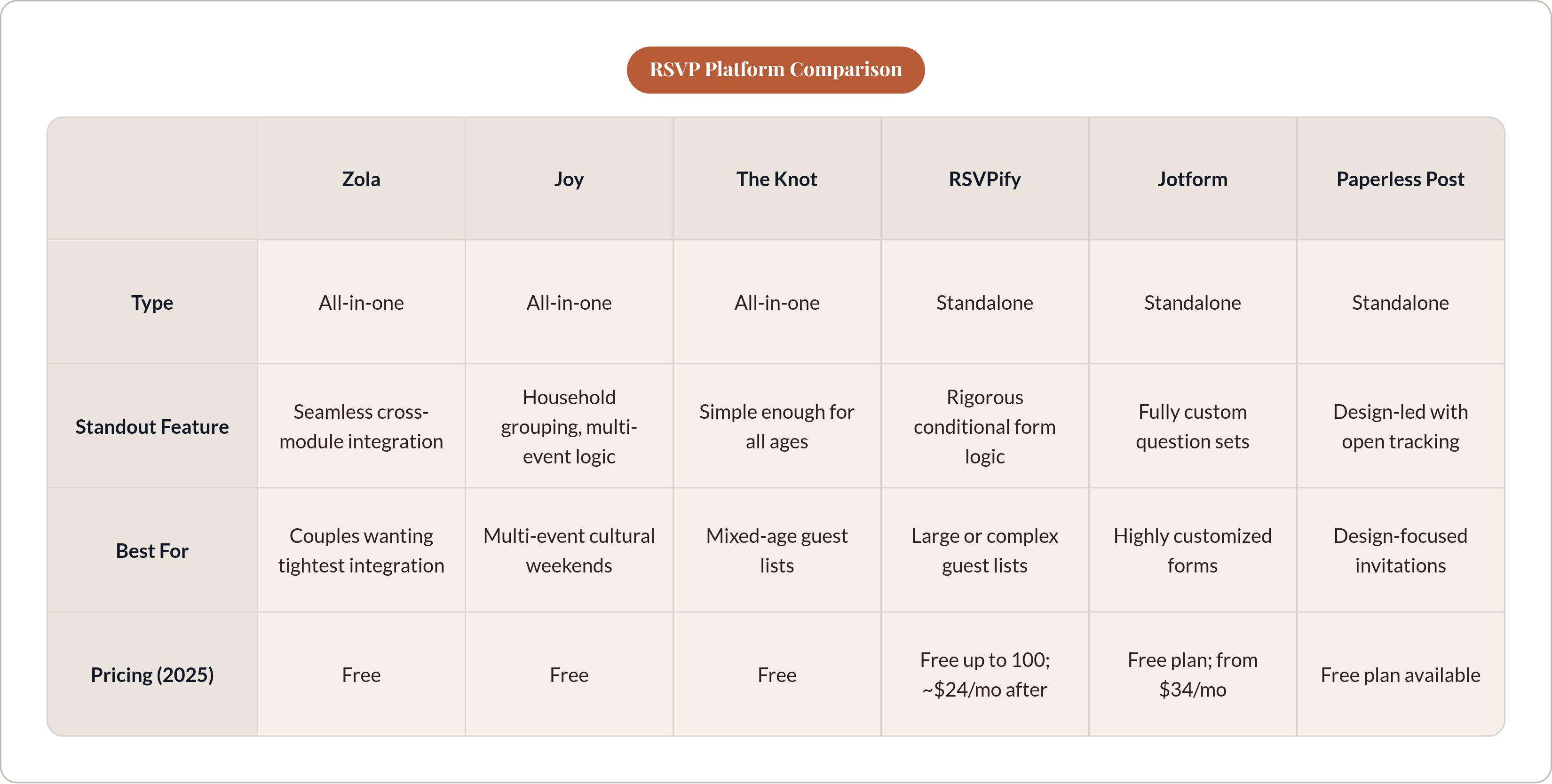
Platforms split into two camps. All-in-one wedding planning tools where RSVP is one piece of a larger system, and standalone tools built around the form itself.
All-in-one platforms:
- Zola. RSVP connects directly to the guest list, wedding website, and seating chart. Conditional logic handles multi-event weekends without showing the wrong events to the wrong guests. The integration across modules is probably the most seamless of anything in this category.
- Joy. Groups guests by household, so one person responds on behalf of the whole family unit. Handles multiple events with unique logic per event. Well-suited for weddings with a welcome dinner, a Mehndi, a ceremony, and a reception all happening across a weekend.
- The Knot. Free website builder, RSVP connects to a central guest list dashboard that updates automatically. Collects meal choices, dietary notes, and plus-ones. Designed with enough simplicity that guests of all ages can get through the form without needing help.
Standalone tools:
- RSVPify. Built originally for professional event management, not weddings specifically. The most rigorous form logic available. Free for up to 100 guests, paid plans start around $24 per month (2025). Best for large or complex guest lists.
- Jotform. A general form builder with over 100 wedding templates. The most flexible option if you want fully custom question sets. Free plan available, paid plans from $34 per month (2025).
- Paperless Post. Stronger on design than data management. Tracks email opens, sends reminders, and collects meal and dietary information.
The thing that actually separates useful platforms from frustrating ones is not which one has the prettier form. It is whether RSVP data flows automatically into the guest list and seating chart, or whether someone has to export and re-import it manually every time anything changes. Ask that one question before you commit to anything.
Dietary Requirements: Why the RSVP Form Is the Only Workable Moment to Collect Them
The alternative to collecting dietary information at RSVP is collecting it everywhere else. Email threads. Text chains. A note passed through a parent. A WhatsApp message sent three months ago that nobody screenshot. By the time you're two weeks out from the wedding, reconstructing a complete dietary picture from those sources is a miserable job, and it still produces gaps.
Here is what actually needs to land on the caterer's desk before the event:
- Total confirmed headcount
- Meal choices per guest
- Every dietary restriction and food allergy
- Where each flagged guest is seated
That last point is the one that gets missed. The caterer and the servers need to know not just that someone has a nut allergy, but where that person is sitting. A flag buried in a spreadsheet tab does not help anyone during service. A marked seat on a printed chart does.
Collecting dietary information at RSVP solves this once, in a structured field, while the guest is already filling out the form. Some platforms carry those dietary flags directly into the seating chart builder, so a guest who RSVPs with a shellfish allergy appears flagged at their assigned seat without anyone manually updating anything. That is integration earning its place.
Without that sync, the reconciliation happens the morning of the wedding. You are cross-referencing a dietary spreadsheet against a printed seating chart while vendors are setting up around you. It is not a situation anyone plans to be in. It is just where disconnected tools tend to leave you.
The RSVP form is also the right place to collect:
- Accessibility needs (step-free seating, hearing loop proximity)
- Whether children are attending (affects both catering count and seating zones)
- Accommodation preferences if a room block is held
When evaluating any platform, ask directly: does dietary data sync to the seating chart automatically, or is there an export step? The answer tells you how the platform was actually built and whether the integrations are real or just marketing language.
How Guest Data from RSVPs Flows into Seating Chart Decisions
Open seating works below roughly 50 guests in a casual setting with no plated meal. Above 100, it starts generating problems. Awkward gaps form. Tables fill unevenly. Elderly guests stand near the entrance looking uncertain about where to go. You need an assigned chart, and the chart needs clean input data to function.
Before touching any seating tool, spend ten minutes building a simple guest list with columns for name, relationship category, dietary flags, and any known conflicts. It sounds tedious because it is, but it prevents hours of back-and-forth once you're actually placing people. Think of it as drawing a map before you start the drive: the map doesn't move your car, but it keeps you from getting lost halfway there. For complicated family situations, a rough conflict map is worth the effort too. Who cannot share a table. Who should not have a direct sightline to someone else. Map those constraints before you start moving anyone around.
A well-integrated seating tool does the following with confirmed RSVP data:
- Imports guest names and dietary flags automatically
- Allows drag-and-drop table assignment with dietary notes visible per seat
- Exports a catering-ready list with per-table dietary breakdowns for the kitchen and per-seat meal assignments for servers
- Generates a printable or QR-scannable floor plan guests can use on the day
SeatPlan.io is worth naming as a concrete example. It handles up to 200 guests with eight dietary need tags, accepts a venue photo or PDF and converts it into an editable floor plan, and exports A3 PDFs for venue staff, Excel lists for the catering team, and Apple and Google Wallet seat passes for individual guests.
That A3 posted backstage for the service team is genuinely useful during the event. Every server can see at a glance where dietary requirements are seated. But that chart is only as useful as the data behind it. If the dietary information coming in was incomplete or manually reconciled from three different sources, the printed chart reflects those errors. Clean data in, clean chart out. The reverse is also true.
What RSVP Data Does for Catering Counts and Vendor Conversations
Caterers don't just need a number. They need meal-choice breakdowns and dietary summaries to figure out station quantities, portion counts, and prep volumes. The cleaner that information, the less the kitchen is estimating. And estimates at scale translate directly into line items on the final invoice, usually in the wrong direction.
Final headcount confirmations are typically required several weeks before the event. Per-head pricing means late or inaccurate counts show up as real money. Over-order because responses were vague? Real cost. Need a last-minute supplement because the estimate came in low? Also a real cost, and now you are negotiating it under pressure with a vendor who has every right to charge a premium.
A live RSVP dashboard gives the couple a current number, not a figure from a spreadsheet that was last updated three days ago. When the venue calls asking for the headcount, the answer should take thirty seconds. Not an afternoon of reconciliation.
The biggest enemy of accurate headcount reporting is a large group of guests who said they're "probably coming." Platforms with automated reminder sequences shrink that group significantly, because they keep following up until people actually commit. The couple doesn't send individual nudges. The platform does, and it leaves a response trail the couple can reference in any conversation with the venue or caterer.
The Real Planning Cost of Disconnected Tools
The typical disconnected setup looks like this. RSVPs in a form tool. Guest list in a spreadsheet. Dietary notes scattered across email threads and a WhatsApp group. Seating chart in a separate app. Vendor correspondence in an inbox. Every time anything changes in one place, it has to be manually updated everywhere else.
A late dietary update from one guest means opening four systems and correcting each one separately. A plus-one name change ripples through spreadsheet tabs, a seating chart, and a catering document. This is where errors come from. Not from carelessness. From the sheer number of places the same piece of information has to live simultaneously, maintained by someone who is also doing a hundred other things.
Consider a couple planning a 180-person wedding across a full weekend. They used three separate tools that didn't sync: one for RSVPs, one for the seating chart, and a spreadsheet for dietary notes. Two weeks out, a guest updated her allergy information by replying to the reminder email. That update landed in an inbox. It never made it to the seating chart. On the day itself, the server brought out the wrong meal. Nobody was hurt, but the couple spent twenty minutes of their cocktail hour tracking down the catering manager to fix it. The platform didn't fail. The gap between the platforms did.
According to The Knot, 78% of couples used online tools to plan their weddings in 2024, with organization and time-saving as the top stated benefits. Those benefits only fully materialize when the tools are talking to each other. Disconnected tools used in parallel close some of the gap, but not all of it, and the gap that remains tends to surface at the worst possible moments.
Medium-to-large wedding planning runs to hundreds of hours of work. A meaningful chunk of that time is pure data reconciliation. The same information, entered in multiple places, kept in sync manually. Integrated tools don't eliminate all of it. But they eliminate the most repetitive, most error-prone part of it. And that part, specifically, is the one that causes problems on the day itself.
What to Look for When Choosing an RSVP Tool That Connects to the Rest of Wedding Planning
The right question when evaluating any platform is not "how does the form look?" It is "where does the data go after someone hits submit?"
Integration points worth confirming before you enter a single guest name:
- Does RSVP data sync automatically to the guest list, or is there an export/import step?
- Do dietary flags carry through to the seating chart without manual re-entry?
- Can the seating chart export in a format the venue and caterer can actually use (PDF, Excel)?
- Does the tool send automated reminders, and can the couple control the timing?
- Is there invite-only or guest-code access control?
- Does it handle multi-event logic if the wedding spans more than one hosted occasion?
Pricing structure matters more than it first appears. An engagement runs 12 to 18 months. A free-to-start tool with a single one-time upgrade is a very different financial commitment than a monthly subscription running the full planning period. Know which one you are signing up for before you've built your entire guest list inside it.
Guest experience on the form matters too. The form should be completable on a phone in under two minutes. Long or confusing forms suppress response rates, and lower response rates mean more manual chasing, which is precisely what the tool was supposed to prevent.
For older guests: confirm there is a non-digital fallback, or that someone in the couple's network can help those guests through the process. A tool that a meaningful slice of the guest list cannot use is an incomplete solution regardless of how clean its integrations are.
The platform worth choosing is the one that eliminates the most manual re-entry. Every data field that flows automatically from RSVP form to guest list to seating chart to catering export is one fewer thing to reconcile during an already busy final stretch. The form is just the front door. What happens after the guest walks through it is the part that actually matters.