Wedding Planning Tools Designed for Professional Planners
The core features pros need reveal what any couple should demand from their planning tools.

Professional wedding planners didn't arrive at their software requirements by accident. They got there by doing the work, making the mistakes, and eventually realising that running a wedding out of a folder of email threads is a slow way to lose your mind. The tools they now rely on are the direct result of that pain. And here's the thing: the problems those tools solve are not unique to professionals managing many weddings at once. They are the same problems any couple faces when planning one. The scale is different. The friction is identical. Understanding what pros actually need from their software is, practically speaking, a map of what organised wedding planning requires from anyone.
The Feature Set Pros All Agree On
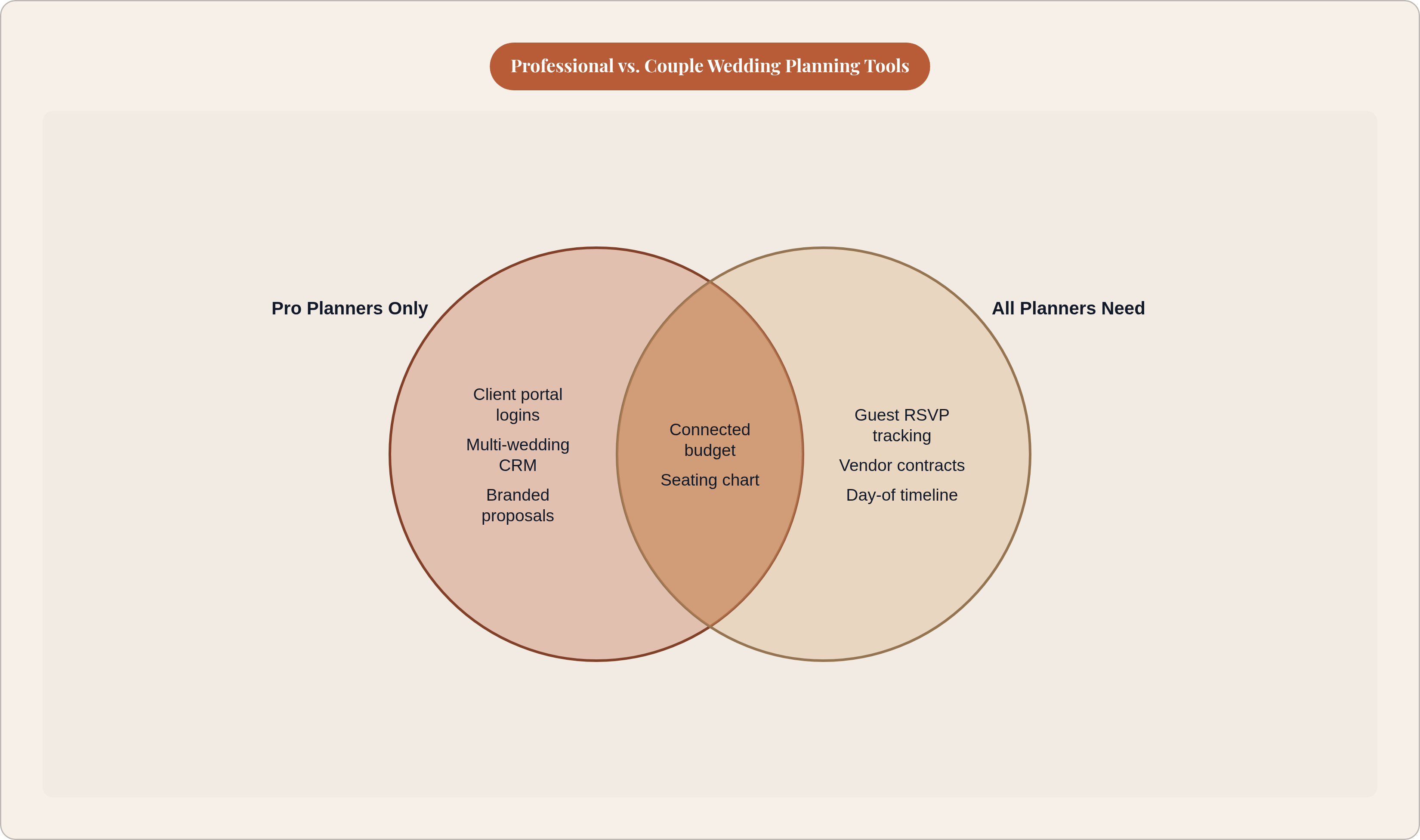
It doesn't matter whether a platform costs $19 a month or $200. If it's built for professional wedding planners, it will have the same core set of features: a client portal, a connected budget, vendor management, guest and RSVP tracking, a seating chart, and timeline tools. Every serious platform in this space has converged on that list.
That convergence is not a coincidence or a marketing trend. It is the minimum set of capabilities a complex, multi-vendor, multi-month event requires to not fall apart.
A few platforms worth knowing:
- Aisle Planner leans into checklist and timeline management, detailed budgeting, and a branded client portal. Its own documentation reports that 93% of wedding professionals use it to streamline their planning.
- That's The One (TTO) centralises RSVPs, guest lists, seating charts, budgets, and timelines in a single platform. It positions itself as replacing more than $330 in separate specialist tools at $55 a month.
- Planning Pod claims over 20 integrated tools that help professionals save 62-plus hours per month and serves more than 70,000 event and hospitality professionals.
- Plutio, at $19 a month, connects CRM, proposals, contracts, project management, and invoicing so that a signed contract automatically generates a project with milestones already tied to each vendor.
The platforms that win with professionals are not the ones with the longest feature list. They are the ones where data moves across features without being re-entered. A vendor quote that feeds the budget. An RSVP that feeds the seating chart. A guest count that updates the catering brief. That connectivity is the actual product. Everything else is just a form.
What the Client Portal Reveals About Information Flow
The client portal is the one feature that is genuinely specific to professionals with paying clients. A couple doesn't need to issue themselves a login. But what the portal actually does tells you something important about how information should move through any planning process.
It creates a single source of truth. Both planner and client can see it. Both can update it. Guest counts, dietary notes, vendor confirmations, and payment status all live in one place instead of scattered across email threads from six months ago. When one piece of data changes, everything downstream changes with it.
HoneyBook's branded portal, built for vendors rather than couples, illustrates this clearly. A contact form creates a project record. That project record triggers a contract. The contract feeds a payment timeline. Each step populates the next. Nothing gets re-entered. Nothing gets lost in a "did I forward that to you?" exchange.
For a couple, the equivalent is a planning platform where the same guest record that captures an RSVP also carries that guest's dietary requirement forward to the seating chart and the catering brief without anyone having to type it again.
The right question to ask of any planning tool is not "can it do this task?" It's "does doing this task here update everything else that depends on it?" If the answer is no, you are just doing the same admin in a slightly nicer interface.
The Gap Between What You Budgeted and What You'll Spend
Nearly 60% of couples exceed their initial wedding budget. Professional planners are hired, in part, to keep their clients out of that majority. The reason pro budget tools actually help is not that planners are better at math. It's that the tools are built differently.
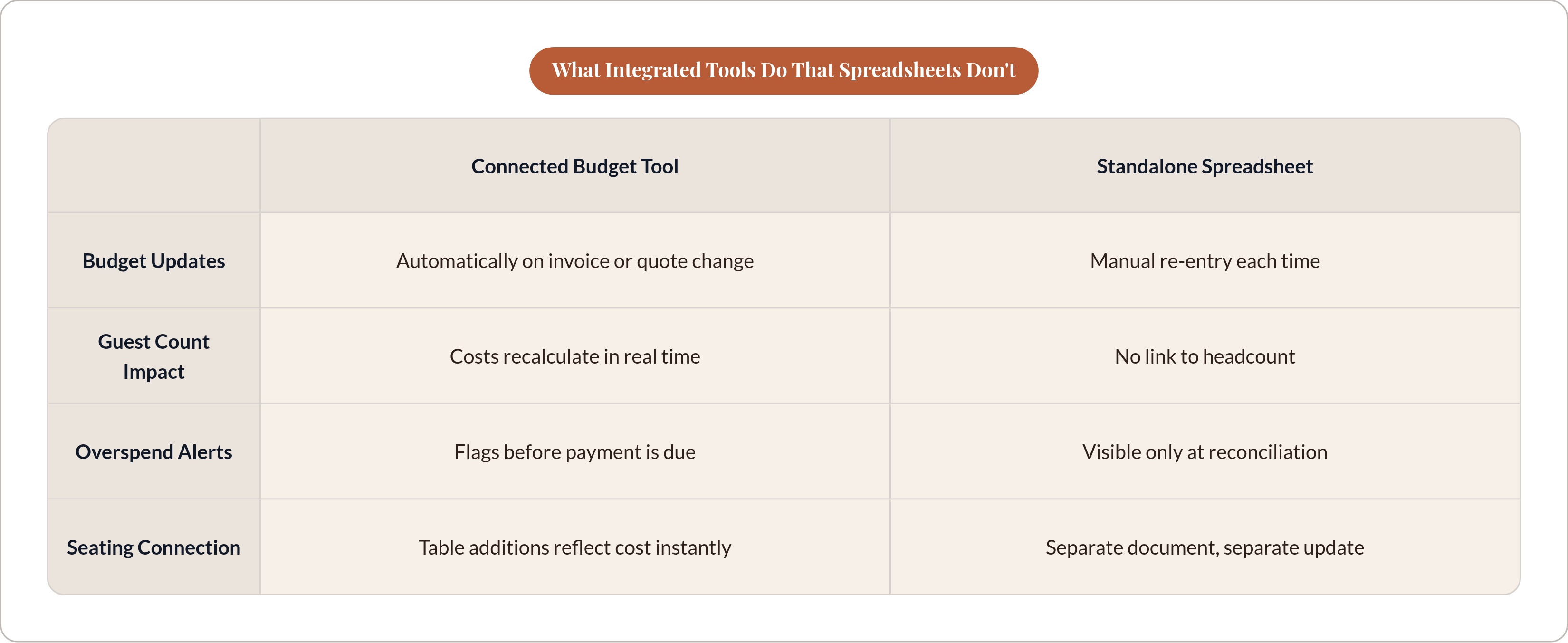
A spreadsheet is a snapshot. A connected budget tool is a live ledger. The difference matters most at the moment of a decision, not at reconciliation. Think of it this way: relying on a spreadsheet to track a wedding budget is like navigating a road trip with a photograph of the map — it tells you where things were, not where they are.
Here's what professional budget tools do that spreadsheets don't:
- Track actuals against estimates in real time without requiring a manual update every time an invoice arrives
- Connect guest count to cost, because venue, catering, and alcohol (which together often account for the largest chunk of total spend) all scale directly with headcount
- Flag overspend before a payment is due, not after it's already gone
VowLaunch's seating tool is a good example of budget logic built into a logistical feature. Every table added to the layout shows the financial impact in real time: linens, centrepieces, chairs, catering covers. The seating chart and the budget are connected. That's not a design flourish. That's the only way cost feedback is actually useful, because it arrives at the moment you're making the decision that creates the cost.
Research from 2025 found that 59% of couples said economic conditions affected their wedding budget, and roughly 40% scaled back their guest count in response. That kind of adjustment only produces real savings if the budget tool can show you, in the moment, what each headcount change actually costs. A budget tool that lives separately from the guest list can't do that. One that connects to it can.
Vendor Tracking: Where Everything Lives and Why That Matters
The average wedding involves 14 vendors, per The Knot's 2025 Real Weddings Study. Each one has a quote, a contract, a payment schedule, and a day-of brief. Those documents almost never live in the same place.
Professional platforms fix this by attaching every vendor's contract, payment milestone, and communication record to the relevant event project. The planner sees status at a glance instead of searching email. Plutio's model is the clearest version of this: a signed proposal automatically creates a project with vendor milestones already populated. There is no gap between "agreed" and "tracked."
For a couple managing one wedding without a planner, the fragmented version of this looks familiar:
- Quotes sitting in email
- Contracts buried in a downloads folder
- Payment reminders living only in memory
Re-entering a vendor's contact details into a seating chart, then into a day-of timeline, then into a payment tracker is the same duplication problem that drove professionals to adopt connected platforms. The fact that you're only doing it for one wedding doesn't make it less annoying or less error-prone. It just means you'll only miss one deposit instead of several.
Structured vendor comparison (side-by-side quotes, contract status, payment due dates visible in one view) is not a luxury feature for planners juggling many clients. It is how any couple avoids the specific panic of realising, three days before the wedding, that they never actually received a signed contract from the florist.
The test: when you add a vendor to your planning tool, does it create a budget line item? When you confirm that vendor, does it update your day-of timeline? If not, you still have a data entry problem. You've just moved it to a slightly more expensive interface.
Why Seating Is Always the Hardest Problem
Ask any venue manager or experienced planner what causes the most chaos on the day of a reception. It is rarely a missing vendor. It is almost always an inaccurate or outdated seating chart. Nearly 45% of brides identify guest list and seating logistics as the single most anxiety-inducing task in planning, per Zola's First Look Report, and the average couple makes somewhere between 15 and 20 revisions before they're done.
Seating is hard for a specific reason. It is not a one-time task. It is a living document that has to absorb every RSVP change, every dietary update, and every last-minute relationship complication, sometimes right up to the week of the wedding. The chart you made in November is not the chart you need in March.
What makes this particularly unforgiving is the dietary requirement problem. A guest's allergy or restriction needs to travel from the RSVP form to the seating chart to the catering brief without being re-entered at any step. Every re-entry is a point where the information can be lost, mismatched, or simply not transferred because someone forgot. And the consequences aren't abstract. A server who doesn't know which guest at table 7 has a nut allergy is not a planning inconvenience. It's a medical risk.
Here's what professional tools build specifically for this:
- WedSites reads dietary data directly from the RSVP record. When a guest indicates a restriction on the form, it shows up on their seat. No separate entry step.
- SeatPlan.io allows export of the final layout as a PDF sized for kitchen and service teams to post in back of house. It also offers a QR code option so guests can scan a sign to find their own table, removing the need for a paper escort card arrangement entirely.
- VowLaunch uses AI placement suggestions as a starting point, taking guest relationships, dietary needs, and mobility considerations into an initial arrangement that the planner or couple then refines by drag and drop.
Professional planners also build accessibility into seating logic from the beginning: wheelchair-accessible positions with clear pathways, elderly guests seated away from high-traffic areas and near facilities. These are not afterthoughts. They are things an unstructured chart cannot enforce because it has no way to flag them.
The seating chart is the feature that most clearly exposes whether a platform's data is genuinely connected. If changing a guest's RSVP status requires a separate update to the seating chart, the tools are not really integrated. They are just two spreadsheets with a shared name.
Specialist Tools Tell You What's Missing, Not What's Extra
Some professional planners layer specialist tools on top of their core platform. Two worth knowing:
- Timeline Genius builds detailed, vendor-by-vendor event timelines. Planners report saving around 65% of their timeline-creation time. But it has no budgeting, RSVP management, or floor plan features, so it is always used alongside something else.
- Prismm (formerly Allseated) offers advanced, CAD-quality floor plans and 3D venue visualisation. Useful for large or complex venues. But it has no RSVP integration, so guests have to be added manually.
The cost of layering tools is not just the subscription fees, though those add up fast (documented estimates for professional tool stacks run into the hundreds per month). The bigger cost is coordination time. A timeline built in Timeline Genius that doesn't read vendor data from the main platform has to be manually updated every time a vendor detail changes. A floor plan in Prismm that doesn't know the guest list requires manual guest additions, which re-introduces exactly the RSVP-to-seating gap that integrated tools exist to close.
For couples, the lesson here is not "use these tools." It is that every specialist tool a professional adopts is pointing at a gap in their primary platform. When you're evaluating a planning tool for your own wedding, ask what it cannot do and where you'd have to go to do it. That gap is where errors live.
A platform that looks full-featured but hands off key steps to exports and manual re-entry is not meaningfully different from a spreadsheet. It just costs more.
What That 78% Figure Actually Tells You
The Knot's 2025 Planner Survey found that 78% of professionals who use dedicated software report happier clients and fewer logistical problems. That number is worth unpacking, because it is easy to read as general enthusiasm for technology and miss what it's actually measuring.
"Dedicated software" in this context means tools built specifically for wedding planning workflows, with the connections between guest data, budget, vendor records, and seating that general-purpose tools don't have. It does not mean any digital tool. It means connected tools.
"Happier clients and fewer logistical problems" are not soft, feel-good outcomes. They describe the absence of the specific failures couples fear most: a dietary requirement that didn't make it to the catering brief, a vendor payment that slipped past its deadline, a seating chart that doesn't match who actually showed up.
The statistic describes professionals managing multiple concurrent weddings. The implication for a couple managing one is straightforward: the same connected-tool logic should produce the same reduction in logistical failure, at smaller scale but with the same structure. Fewer manual handoffs means fewer errors. That principle doesn't change based on how many weddings you're running.
One honest limit: this is a survey of planners who already use planning software, conducted by a company that sells to that market. It measures reported satisfaction, not controlled outcomes. But it aligns with what the tool architecture itself explains. The results are what you'd predict from the design.
How to Evaluate a Couple-Facing Tool Against the Pro Standard
Here is what professionals require. Use it as a checklist.
Data flow:
- Guest information moves from RSVP to seating chart to catering brief without re-entry
- Budget updates automatically when guest count or vendor quotes change
- Vendor records (quotes, contracts, payment milestones) are attached to the wedding project, not scattered across email
Day-of usability:
- Seating chart reflects dietary flags at the seat level, exportable in a format caterers and servers can actually use
- Day-of logistics (table finder, timeline, vendor contacts) are accessible on mobile without requiring a stable internet connection or a printed backup
Three questions to ask before committing to any tool:
- If a guest changes their dietary requirement after RSVPing, does the seating chart update automatically?
- If a vendor's quote changes, does the budget update without a separate entry step?
- Does the guest count live in one place, or separately in the RSVP tool and the seating chart?
One more thing worth noting: professional planners amortise monthly software costs across paying clients. A couple planning one wedding does not. A tool that charges monthly for the full length of an engagement applies a fundamentally different cost logic to a one-time event. That doesn't make subscription tools wrong for couples. It means the comparison should be total cost over the engagement, not the monthly rate.
The features that make a professional planner efficient are not complexity for its own sake. They are the solution to problems that are built into the nature of the event: many people, many vendors, many moving pieces, all of which have to arrive at the same place at the same time. The pros figured out what they needed because they couldn't afford not to. Couples can use that knowledge without having to learn it the hard way.