Wedding Planning Spreadsheet Templates for Couples

A wedding planning spreadsheet isn't one document; it's five documents pretending to be one. Budget. Guest list. RSVPs. Vendors. Seating. Each has its own rhythm, its own update schedule, and its own way of quietly falling apart if you ignore it for three weeks.
Some commercial templates stretch this across twelve tabs. Free downloads from places like The Knot compress it all into four. Both can work. The tab count isn't really the point.
What matters is understanding why each area exists separately:
- Budget shifts when you sign contracts
- Guest list shifts when RSVPs trickle in
- Seating shifts last, only after everything else has settled
Couples who collapse these together or skip tabs entirely don't save themselves work. They just relocate the chaos to an email thread they'll spend forty-five minutes digging through in week eleven.
Here's how each area actually works, and where each one breaks.
How to set up the budget tab before you tour a single venue
Set up your budget tab the same week you get engaged. Before you visit a single venue. Before you even google florists.
This feels dramatic until it isn't. Here's what happens when you skip it: you tour a venue, you love it, you sign. And then every other budget category quietly bends around that one decision. The photographer gets cut. The catering package gets downgraded. The band becomes a DJ, and then the DJ becomes a playlist. None of those were conscious choices. They were consequences of a budget that didn't exist before the venue did.
The column structure that actually works
Every budget row needs five columns:
- Category (what it is)
- Estimated Cost (your best guess before contracts)
- Actual Cost (what the contract locks in)
- Amount Paid (what has left your account)
- Balance Owed (what's still due)
Pin a summary row at the top: total budget, total estimated, total actual. That way you're looking at a live number every time you open the sheet instead of doing arithmetic at ten p.m.
Start with percentages, not dollar amounts
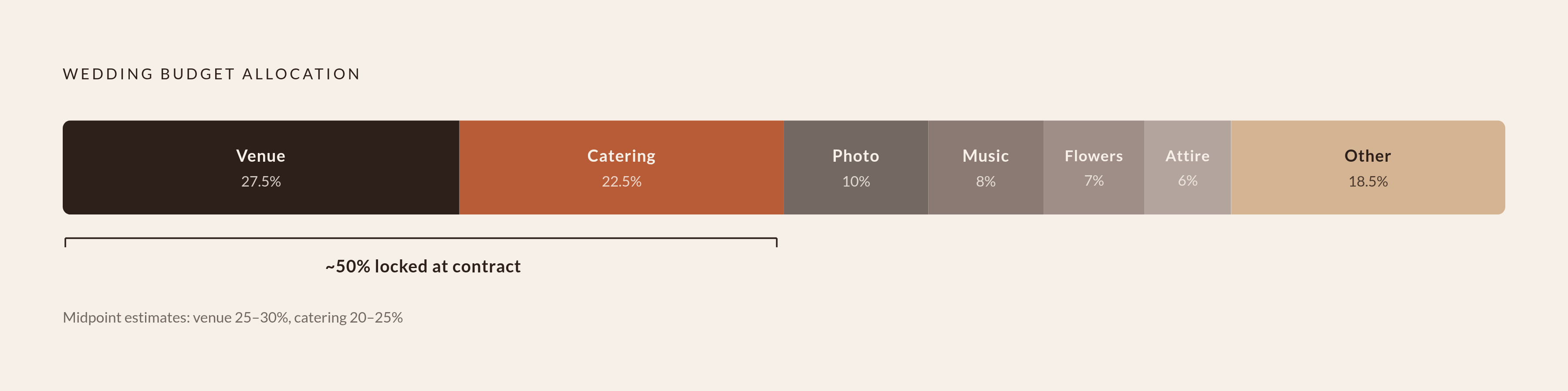
Before you have any real quotes, use percentages to rough out proportions. Venue and reception (food, beverages, cake) typically absorb around half the total budget. Venue alone runs 25–30%. Catering adds another 20–25%. Which means the moment you sign a venue contract, the majority of your budget is effectively spoken for.
For a reference point: The Knot's 2026 Real Weddings Study puts the average wedding at $34,200, with a median closer to $18,000. The gap exists because a handful of very expensive weddings drag the average up. The median is the more honest number for most people.
The same study found couples consistently underestimate their final cost by 20–30% before signing their first vendor. Build that into the tab from the start.
Two columns almost every free template skips
Payment timing. Vendors commonly require a 25–50% deposit at signing and the balance 30 days before the wedding. When money moves matters just as much as how much. Add columns for deposit due date and balance due date.
Contingency. Hold 5–10% of your budget as a real, named line item. Not a vague intention. An actual row with an actual number. If you don't touch it, great. If you do, it was already accounted for.
The hidden costs that budget tabs consistently miss
Service charges are the most reliable blindspot. A catering quote of $100 per plate becomes $130 or more once you add the service charge (often around 22%, which is not a gratuity; it goes to the venue, not the staff) plus state tax. The per-plate number looks reasonable. The final invoice does not.
Other line items that need their own rows before a dollar amount is assigned:
- Vendor meals. Photographers, DJs, and coordinators are often contractually owed a meal. Budget for it explicitly.
- Gratuities. The Knot pegs this at a minimum of $800 as a standalone line item. Set it aside early.
- Postage. Heavier invitation suites can run $1.50–$2.00 per envelope. Multiply that by your guest count.
- Vendor overtime. If the reception runs long, you will pay for every extra hour.
- Transportation for the wedding party on the day.
- Coat check and restroom attendants at venues that require them.
Across all of these, the gap between what quotes show and what you actually pay lands somewhere between 9 and 15 percent. WeddingWire found that nearly 60% of couples increase their initial budget during planning. Most of that increase isn't extravagance; it's just rows that weren't there.
The fix isn't starting with a bigger number. It's starting with a more complete list. A budget tab that names every category, even before any dollar amount exists, is the only version that actually works.
Guest count as the variable that controls everything else
The average cost per guest runs around $290–$300. At that rate, your guest list isn't an administrative task. It's a financial decision, and probably the most powerful one you'll make.
Cutting from 150 guests to 75 saves more than $15,000 across venue minimums, catering, invitations, favors, and cake. Removing 20 people frees up roughly $6,000. Those aren't rounding errors. That's a photographer upgrade or an entire honeymoon.
This is why the guest list tab and the budget tab need to be built at the same time, not sequentially. The guest count should feed directly into the per-head calculation in the budget. If that connection is manual and you update one without updating the other, you're making decisions against numbers that aren't real anymore.
In a flat spreadsheet, that connection is always manual. That's just the reality.
What the guest list tab needs to track beyond names
A guest list tab that only stores contact information is just a fancy address book. It holds data fine. It doesn't do anything with it.
A functional guest list tracks:
- Full name
- Plus-one (their actual name, not a checkbox)
- Relationship category: immediate family / extended family / friends / colleagues / plus-ones
- Side: bride or groom
- RSVP status
- Dietary requirement (structured, not freeform)
- Thank-you card sent: yes or no
The dietary field is not the place for freeform text
If you let guests type whatever they want, you'll end up with "no meat," "veggie," "I don't eat gluten," and "vegan please" as four separate entries that all mean more or less the same thing. Standardized dropdown options keep the catering handoff clean. Build in set choices: no preference, vegetarian, vegan, kosher, halal, gluten-free, dairy-free, other.
The relationship category column matters beyond organization. It's the material you'll use for seating logic eight months from now. Collect it now, while the information is easy to get.
How RSVP tracking works in a spreadsheet and where it breaks down
Set your RSVP deadline at least six weeks before the wedding. Caterers typically need a final headcount two weeks out. You need at least a week after that to do seating work. A deadline that lands two or three weeks out leaves no cushion, and something will always require one.
In a spreadsheet, RSVPs come in as emails, texts, paper cards, voicemails, and someone grabbing your arm at a birthday party to say they can make it. Every single one needs to be manually logged into the right row. That job falls to you, usually at the end of a day when you'd rather not.
The predictable failure: a guest RSVPs via the card, then separately emails a dietary restriction. The dietary information lives in a thread you will spend twenty minutes finding in week ten. For guest lists over 100, the manual logging load accumulates fast. This is the moment where "we're on top of it" quietly stops being true.
One fix that actually helps
Add a "responded" column that's separate from the "attending" column. Non-responses become a real category you can filter and act on, rather than empty cells that vanish into the sheet.
What a spreadsheet genuinely cannot do
- Send follow-up reminders to non-responders
- Collect dietary information at the moment someone RSVPs, in a structured way
- Automatically update the headcount and budget when a new response comes in
All of that is a manual step. Every time. That's not a flaw in the spreadsheet's design; it's just the honest ceiling of the tool.
Building the vendor tab so quotes are actually comparable
The basic version of a vendor tab is a contact list: name, category, phone, email. Fine for finding a number. Useless for making a decision.
A vendor tab that actually helps you compare looks like this:
- Vendor category and name
- Quoted price
- What the quote includes (hours covered, deliverables, travel, second shooter, etc.)
- Deposit amount and due date
- Balance due date
- Contract signed: yes or no
- Notes on fit, gut feeling, or anything that gave you pause
Without a "what's included" column, two photography quotes at similar prices look equivalent when one covers eight hours with a second shooter and the other covers six hours alone. Same number, different deal entirely.
The payment timing columns should cross-reference directly with your budget tab. Most couples break this link by keeping vendor info in a separate doc or email folder, which means the budget never reflects what's actually committed. Keep it in the same spreadsheet. Build the connection manually, because the spreadsheet won't build it for you.
Setting up the seating chart tab and when to actually start it
The most common seating chart mistake is starting too early. A chart built before RSVPs are confirmed is built on assumptions, and every late decline means rebuilding a section. It is a demoralizing way to spend a Tuesday night in month nine.
The right window: lock the venue floor plan six to eight weeks out. Don't begin actual assignments until the RSVP deadline has passed and every non-responder has been followed up on and resolved.
A two-tab structure that works
Tab 1: Your guest list, with dietary requirements and relationship categories already filled in from earlier. This is the payoff for collecting that information back in month three.
Tab 2: Table assignments. Table number, label if you're using names instead of numbers, seats allocated, guests assigned.
Round tables seat 8–10. Rectangulars seat 6–8. Build in one or two buffer tables for late RSVPs and plus-ones that materialized after the deadline.
Anchor each table to one relationship
Every table works better when it's built around one social anchor. Start with the person whose relationships justify the mix, then fill remaining seats with people connected to that anchor or to you. Guests placed at a table because there was nowhere else logical to put them land differently than guests who were placed there on purpose. It's hard to articulate, but it shows up in the room.
If dietary requirements weren't collected in a standardized format during RSVPs, the seating phase is when you find out. Manually reconciling dietary needs against table assignments at this stage is messy and genuinely avoidable in retrospect, but there's no clean fix for it once you're in it.
Where spreadsheet templates reach their structural limit
Every tab described above works. When it's current. When it's been updated. When the person who updated one tab remembered to update the three others that depend on it.
That is a lot of conditions to hold simultaneously.
The real issue isn't the spreadsheet's design; it's that every connection between tabs is manual. A guest added to the guest list doesn't show up in the seating pool. A vendor deposit logged in the vendor tab doesn't flow to the budget. A dietary update that arrives after the RSVP deadline has to be entered in multiple places, and if it isn't, some version of the sheet is wrong.
Nearly every couple increases their budget during planning, sometimes by 30% or more. Some of that is decision creep. A meaningful chunk of it is information that moved through the spreadsheet imperfectly, arrived in the wrong place, or never made it into a row at all.
Google Sheets helps with collaboration. Two people can access the same file. It doesn't solve re-entry; it just means two people can both make the same manual update, or both miss the same one.
Seating is where this accumulated friction peaks. Dietary data collected at RSVP, if it wasn't standardized and it didn't stay linked, has to be manually hunted down and matched to table assignments. Sometimes the morning of the wedding. Anyone who has done it will tell you the same thing.
What connected planning tools do differently with the same information
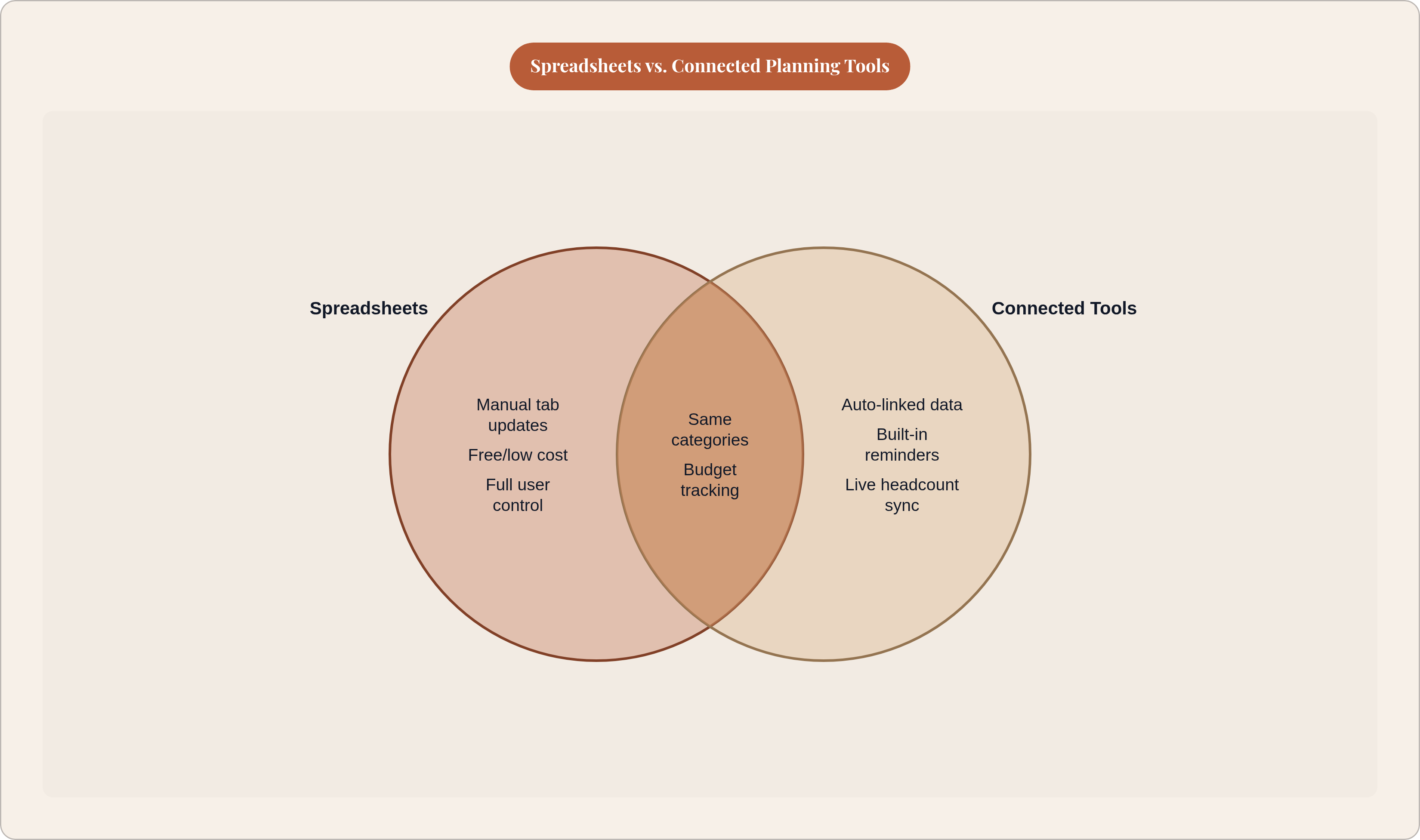
The categories in a wedding planning spreadsheet aren't a spreadsheet invention. Budget, guest list, RSVPs, vendors, seating. These exist because a wedding actually has these parts. They need managing regardless of the tool.
A connected planning system works from the same structure. The difference is that the links between categories are automatic.
- A guest added to the list appears in the seating pool without a manual copy
- A dietary restriction collected at RSVP is visible in the seating view without a cross-reference check
- A vendor payment entered once updates the budget without a separate edit
The categories don't change. What you decide to track doesn't change. What changes is the labor between them. In a spreadsheet, that labor belongs to you. In a connected system, it's handled.
Learning the spreadsheet version first is still worth doing. Not because it's the best tool, but because building it forces you to understand what the categories are and why they depend on each other. That understanding transfers to any system you use later. It's the difference between a planning tool that's actually working and one that's just open on a tab.